

Your camp check-in process is a live test of how connected your operations are. When check-in is tied to registrations, permissions, and communications, families move quickly and safely; when it runs on a standalone app, outdated system, or a paper roster, the gaps show. The right camp check-in software turns your busiest moments into your most reassuring ones.
Watch the check-in line on the first morning of a session and you’ll learn more about a camp than any brochure could tell you.
Is the line moving? Do staff members know who’s arriving? When a parent mentions a new pickup person or a fresh allergy note, does it get captured or scribbled on a sticky note that disappears?
Check-in is the moment your operations meet your families face to face. It’s short, it’s high-pressure, and it’s revealing. The busiest moments of your day expose your operational gaps. A smooth, confident check-in tells parents their child is known and safe. A chaotic one puts that in doubt.
The opportunity costs are easy to overlook: Every minute your staff spend wrestling with logistics is a minute they’re not spending with campers.
5 Messages Your Check-in Process Sends to Families
Check-in doesn’t happen in isolation; there are constantly moving targets to account for. Did campers enrollment change to another week? Did Billy’s doctor's note get uploaded? Did authorized pickup contacts change? It depends on a dozen dynamic variables, but when all these pieces are seamlessly connected, check-in is calm.
Every morning, your arrival process communicates directly to families. Without saying a word, a connected check-in says:
- We’re organized. Our systems talk to each other, and we aren't relying on workarounds.
- We value your time. You won't be stuck in a bottleneck while we hunt for paperwork.
- Your child is safe. We know exactly who is authorized for pickup and have their medical info on hand.
- Our staff is prepared. We are working from real-time data, not last night's printed roster.
- We’re focused on creating a great experience. Our heads are up greeting campers, not buried in logistics.
That’s why the check-in experience is such an honest signal. It shows, in real time, whether your camp runs on connected operations or on workarounds.
The hidden cost of a disconnected check-in
A disconnected check-in usually looks like one of two things: a standalone check-in app that doesn’t share data with your registration system, or a paper roster printed the night before. Both quietly cost you in ways you’re likely familiar with:
- The information is outdated before the day begins. A roster printed last night doesn’t know about this morning’s enrollment change, the payment that just cleared, or the allergy note a parent added an hour ago. Staff start the day working from a snapshot that can become dated fast.
- Updates get stranded. When a parent updates an authorized pickup at the front desk, does that reach the counselor at the gate this afternoon? Disconnected tools and printed hard copies increase the likelihood of confusion.
- The line backs up. When staff have to look people up, confirm details by radio, or hunt for a form, drop-off slows to a crawl. Parents wait in a growing queue, and no one has a clear, real-time picture of who has actually arrived.
- Paper gets lost, and counts drift. Sign-in sheets get miscounted, left in another building, or rained on, so attendance errors creep in and reconciling them can take a chunk out of the afternoon.
- Every gap becomes manual work. Staff re-key information, chase down forms, and radio the office to confirm a name. That’s time, and it’s error-prone.
- And it all multiplies. If you run more than one site, session, or group, every one of these gaps repeats — a separate roster, a separate app, and a separate point of failure for each one.
Meanwhile, parents’ expectations have moved. They manage banking, travel, and groceries from their phones in seconds, and they expect the place caring for their child to feel just as buttoned-up. The real cost of a disconnected check-in isn’t just minutes; it’s attention. When staff are heads-down in logistics, they aren’t watching campers, and parents can feel the difference.
MORE: Why Self-Service Is Becoming a Competitive Advantage for Camps
What does a connected camp check-in look like?
Connected check-in means the moment a camper arrives or leaves is tied to everything else in your operations: registrations, enrollment changes, permissions, communications, participant records, and reporting.
In Camp & Class Manager (CCM), check-in and check-out are connected to the same records families and staff already rely on. So when something changes in one place, it’s reflected everywhere. Keep reading to see what that connection makes possible.
Current rosters and a faster line
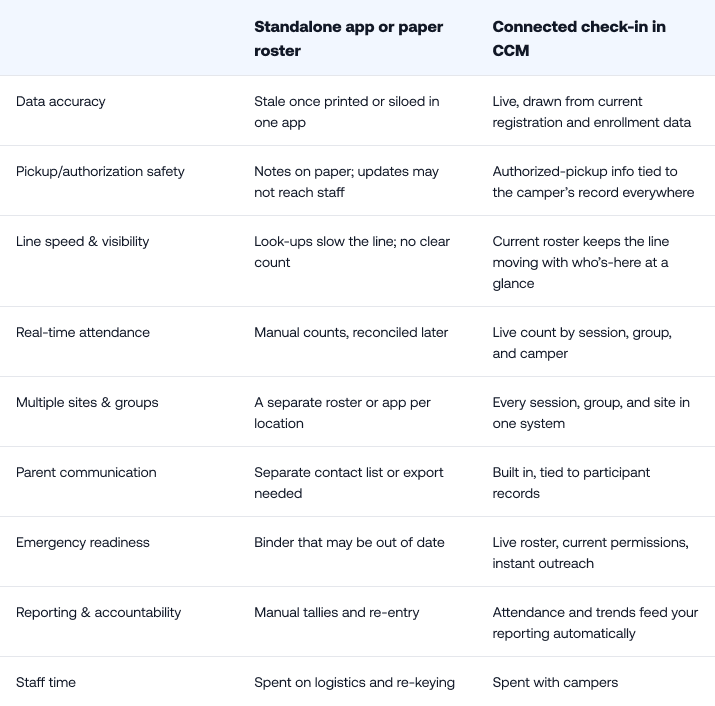
Because camp check-in and check-out draw on live registration and enrollment data, the roster is always current. A camper who enrolled this morning appears. A camper who switched sessions shows up in the right group. Staff aren’t working from a snapshot, they’re working from the truth. And because the right details are already in front of them, the line keeps moving instead of stalling on look-ups.
Pickup permissions and authorized-pickup safety
This is where connection becomes safety. Pickup authorization isn’t a note on a clipboard; it’s part of the camper’s record. Staff can see who is authorized to pick up each child at check-out, and when a parent updates that list, the change is reflected in real time. That means the person at the gate this afternoon sees the same authorized-pickup information the front desk entered this morning.
Real-time attendance, with nothing to lose
Connected camp attendance tracking gives you an accurate, live count of who is present—by session, by group, by camper. Because it’s captured digitally, there are no sign-in sheets to misplace or recount. You know who's arrived, who hasn’t, and who's already been picked up.
That live count matters most when it matters most: during a headcount, a transition, or an emergency.
One system for every group and location
If you run multiple sessions, groups, or sites, connected check-in keeps them all on the same system instead of a separate roster for each. Staff members follow one consistent process whether you operate a single day camp or 30 across several cities, and leadership sees every location in one place rather than stitching together spreadsheets.
Parent communication that meets expectations
Because check-in is tied to your communication tools and participant records, reaching the right families is fast. If a session is running late at pickup, if a child hasn’t arrived, or if plans change, you can communicate from the same system that holds the attendance data—no exporting, no separate contact list.
That responsiveness is exactly what today’s parents expect, and it’s one of the strongest signals that a camp has its act together.
Emergency readiness
In an emergency, you need to know three things instantly:
- Who is here
- Who is authorized to take them
- How to reach every parent
Connected check-in puts all three in one place. Instead of grabbing a binder and hoping it’s current, staff have a live roster, current permissions, and communication tools in hand.
Reporting and accountability
Once check-in and attendance are captured in one place, that data doesn’t just sit there, it feeds your reporting. You can see attendance trends across sessions, spot which programs are filling and which still have room, and track capacity utilization season over season. And when a parent, a board, or a licensing body asks who was where and when, you’ll already have the answers.
Why is connected check-in a safety and duty-of-care issue?
Because check-in and check-out are the two moments you take custody of a child and release it, every part of those handoffs is a duty-of-care responsibility: verifying identity, honoring custody arrangements, confirming authorized pickups, and knowing exactly who is in your care at any moment. Paper and disconnected apps introduce lag and error into precisely the workflow where you can least afford them.
Connected operations reduce that risk. When permissions, records, and attendance update together, you’re taking variables out of the equation.
How does connected check-in change the staff and parent experience?
For staff, it removes friction. Less re-keying, less radioing the office, less flipping through binders. That’s not just efficiency, it's the difference between a counselor watching a clipboard and a counselor watching the kids.
For parents, it builds trust. A fast line, a staffer who knows their child, and confidence that pickup rules will be honored—that’s what turns a nervous first-day parent into a family that re-registers next year.
Every minute staff members aren’t spending on logistics is a minute they can spend with campers. Connected check-in is how you buy those minutes back.
Standalone check-in vs. connected check-in in CCM
See connected check-in for yourself
The best way to understand what connected check-in feels like is to watch it work. Book a demo of Camp & Class Manager and see how connected operations free your staff to spend more time with campers.
MORE: End-of-Summer Reports Every Program Manager Should Review
Frequently Asked Questions
What is camp check-in software?
Camp check-in software records when campers arrive and leave and, when it’s connected, ties those moments to registrations, pickup permissions, attendance, participant records, and parent communication. That connection keeps rosters current and check-out safe, instead of relying on a printed list or a standalone app.
How can I streamline my camp check-in process?
Connect it. The fastest way to streamline camp check-in is to run it on the same system that holds your registration and enrollment data, so rosters are always current and staff aren’t re-keying information. Connected check-in and check-out removes the manual steps that slow the line and introduce errors.
How does connected check-in improve pickup safety?
Because pickup authorization lives in the camper’s record, not on a clipboard. Staff at check-out see the same authorized-pickup information the office entered, and any parent update follows the child automatically—so the right people, and only the right people, take a camper home.
Can connected check-in handle multiple camps, sessions, or groups?
Yes. Running everything on one system means each site, session, and group shares the same current data and the same check-in process, so you’re not juggling a separate roster or app per location. Leadership can also see attendance and trends across every program in one place.
Does connected check-in help in an emergency?
Yes. Connected check-in gives you a live count of who is present, current pickup permissions, and built-in communication in one place. Instead of a possibly outdated binder, staff have an accurate roster and instant parent outreach when it matters most.
How does camp attendance tracking connect to the rest of operations?
When attendance is captured at check-in, it flows into your participant records and reporting automatically. You get accurate counts without double entry, and the same data supports communication, safety, and end-of-season analysis.




.png)