
.avif)
When the summer season finally wraps, it’s tempting to close your laptop and exhale. But the few weeks immediately following your session are actually the highest-leverage time on your calendar. Your data is fresh, your memory of what worked (and what didn’t) is sharp, and because next year’s registration hasn’t opened yet, you have a rare window to act on what you've learned.
A structured end-of-summer data review turns a busy season’s worth of activity into a concrete plan for next year. Instead of guessing at pricing, capacity, and staffing, you can make strategic decisions grounded in what actually happened.
This doesn't have to mean days buried in spreadsheets. Good camp reporting software captures these numbers automatically. In Camp & Class Manager (CCM), essentials like waitlist data and year-over-year financial performance are already built into your dashboard, meaning everything you need is just a few clicks away.
These core reports are the ones every program manager should review at season’s end: what each one shows, what to look for, and the decisions they should drive.
Why is an end-of-summer data review worth your time?
Because it’s the difference between repeating a season and improving one.
Every camp generates signals all summer long: Which sessions filled first, which sat half-empty, where families dropped off, and how much revenue each program produced.
When you review them intentionally, these metrics become a distinct advantage. The camps that grow year after year aren’t guessing—they analyze their own data and act on it early.
The waitlist report: Where was demand greater than supply?
Your waitlist report captures the campers and families who wanted a spot they couldn’t get—the unmet demand that never turned into revenue.
What to look for: Sort by session, program, age group, and week. Look for patterns. Does one week consistently go to waitlist? Does a specific age group fill instantly? Are certain specialty programs turning families away while others sit open?
The decision it drives: A deep, recurring waitlist is the clearest signal you have to add capacity—another session, a larger group, or an additional week. It can also justify a price increase on your most in-demand offerings because demand is outrunning supply.
A waitlist isn’t a problem to hide. It’s a roadmap for growth, and it tells you exactly where families are ready to spend next year.
Revenue performance: Where did your money actually come from?
Your revenue performance gives you the financial picture of the season—total revenue and, more importantly, how it breaks down by program, session, and category.
What to look for: Identify your top earners and your underperformers. Which programs drove the majority of revenue? Which consumed staff time and space without paying their way? Look at add-ons, extended care, and merchandise, too—small per-camper amounts add up quickly.
The decision it drives: Revenue concentration tells you where to invest. If a handful of programs produce most of your income, protect and expand them. If a program loses money every year, decide whether it earns its place for mission reasons or needs a price adjustment.
Year-over-year finance performance: Are you growing or drifting?
A single season is a snapshot. Year-over-year performance is the movie. CCM’s finance tab includes year-over-year performance, so you can compare this season against prior ones without rebuilding the numbers by hand.
What to look for: Track the direction and the rate of change. Is total revenue up or down? Is growth coming from more campers, higher prices, or new programs? Are any programs quietly declining year after year?
The decision it drives: Year-over-year camp revenue trends separate a good year from a good trajectory. Consistent growth in a program is a signal to expand it. A steady decline is a prompt to refresh, reprice, or retire it before it drags on your bottom line.
Registration trends: When and how did families sign up?
Registration trend data shows the timing and pace of sign-ups—when registration opened, when it peaked, how long popular sessions took to fill, and where families abandoned the process.
What to look for: Map the registration curve. Did enrollment spike right at open and then flatten? Did it build slowly? How early did your busiest sessions sell out? And if you can see where families started but didn’t finish registering, that friction is quietly costing you enrollments.
The decision it drives: Timing insights shape your marketing calendar. If registration builds slowly, plan a nurture sequence and reminders. And if you're seeing families drop off mid-registration, review your registration forms to identify questions that could be moved to follow-up forms. Simplifying the registration experience is one of the fastest ways to reduce abandonment and recover lost registrations.
If you're looking to increase enrollment in specific programs, review your Social Referral report to see which registrations came through referrals. If your highest-priority programs aren't generating enough referral activity, consider increasing referral incentives to encourage more families to share with friends and relatives. A small adjustment to your referral rewards can help turn your existing camp community into one of your most effective marketing channels.
Capacity utilization: How well did you match supply to demand?
Capacity utilization measures how full your programs actually were compared to how full they could have been.
What to look for: Calculate fill rates by session and program. Which ran at or near capacity? Which sat well below? Cross-reference with your waitlist: A program with a long waitlist and a full fill rate is under-supplied, while a half-empty program is either mispriced, mistimed, or misaligned with what families want.
The decision it drives: Capacity utilization guides how you allocate space, staff, and marketing. Under-filled programs may need repositioning, a schedule change, or consolidation. Consistently full programs—especially with waitlists—are your expansion candidates.
Read your reports together, not in isolation
No single report tells the whole story. The insight lives in the overlap.
A program with a long waitlist and a high fill rate is a clear expansion candidate. A program with declining year-over-year revenue and a falling fill rate is a candidate to retire or reformat. A session that fills instantly but shows heavy mid-registration drop-off is leaving money on the table at checkout.
This is where program management analytics make a difference for your bottom line. When your registration, revenue, and capacity data live in one system, you can move from one view to the next without rebuilding spreadsheets, and the patterns that matter rise to the surface.
How do you turn these insights into next season’s plan?
Reviewing the reports is the first step. The payoff comes from connecting them into decisions across four areas.
Pricing
Use your waitlist and capacity data to price with confidence. Programs with strong demand and full capacity can support higher prices. Under-filled programs may need a lower entry price, an early-bird incentive, or a bundle to drive volume.
Capacity
Let demand set your supply. Expand sessions and age groups with deep waitlists and high fill rates. Adjust capacity for or consolidate programs that consistently run half-empty, so staff and space go where there’s higher demand.
Staffing
Your fill rates and registration timing tell you when and where you’ll need people. Plan hiring around the programs you’re expanding, and align staff schedules with the sessions that reliably fill.
Marketing timing
Registration trends tell you when to open and when to promote. If popular sessions sell out fast, open registration earlier and build a waitlist-to-early-access pipeline. If demand builds gradually, schedule reminders and create targeted campaigns to keep momentum. If you're trying to grow enrollment in specific programs, consider increasing referral rewards for those offerings to encourage more families to share them with friends and relatives.
The goal is simple: End every season knowing more than you did the year before, and put that knowledge to work before the next one begins.
End-of-summer reports at a glance
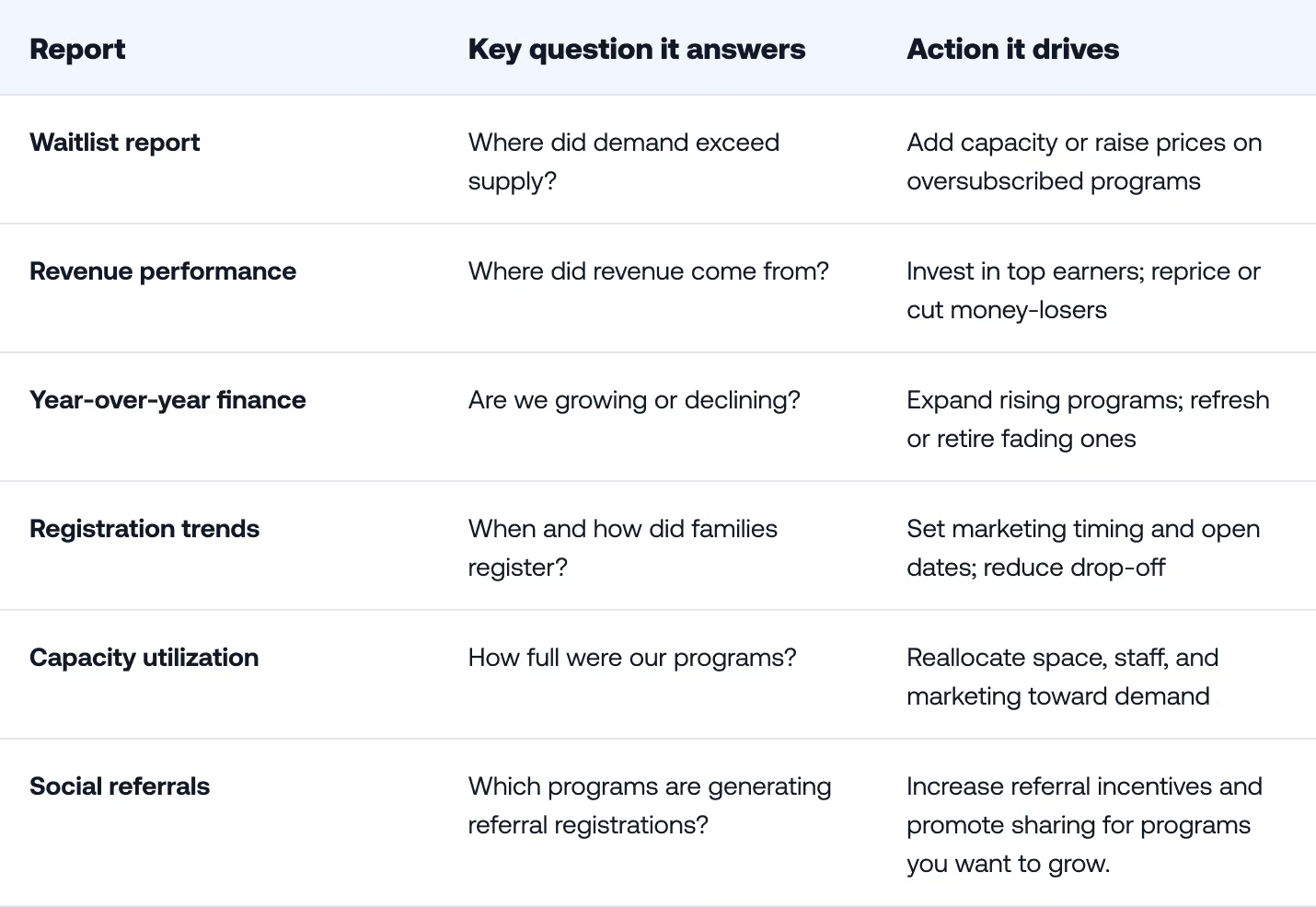
See what your season data is telling you
Your reports already hold the plan for next season—the right software just makes it easy to read. See CCM’s reporting in action and book a personalized walkthrough.
Frequently asked questions
What are the most important end-of-summer camp reports to review?
Start with five: your waitlist report, revenue performance, year-over-year finance trends, registration trends, and capacity utilization. Together they show where demand went unmet, where revenue came from, whether you’re growing, and how well you matched supply to demand.
When should I review my camp’s season data?
Review it in the weeks right after your season ends, while the data is fresh and before next year’s registration opens. That timing gives you room to act on what you learn—adjusting pricing, capacity, staffing, and marketing before the next cycle begins.
What does a camp waitlist report tell me?
A waitlist report shows unmet demand—the families who wanted a spot you couldn’t offer. Recurring waitlists on specific sessions or age groups signal where to add capacity or raise prices, because demand is outpacing supply.
How does camp reporting software help with planning?
Camp reporting software captures registration, revenue, and capacity data automatically, so your end-of-season review takes clicks instead of spreadsheets. In Camp & Class Manager, reporting includes a waitlist report and year-over-year performance on the finance tab, giving you the numbers you need to plan the next season.
What is a good capacity utilization or fill rate for a camp?
A healthy fill rate depends on your programs, region, and goals, so compare against your own history first. As a rule of thumb, consistently full programs with waitlists are expansion candidates, while under-filled ones may need repricing or rescheduling.




.png)